
Does ChatGPT mention your company with an outdated website, address or description? Eligible businesses can claim their profile through the new Business Hub and maintain their information. This guide explains the process, what to prepare and how your Google Business Profile fits into the picture.
Checked on 16 November 2026. Businesses in ChatGPT is in beta. Availability and interface labels may change, so revisit the linked official guidance before setting up your profile.
What does claiming a business profile mean?
Claiming means establishing that you are authorised to manage a business listing. Simply asking ChatGPT to add your company does not complete that verification.
OpenAI introduced Businesses in ChatGPT on 10 November 2026. Business Hub provides tools for maintaining business information. Business Agents are an additional feature, initially available to eligible ecommerce and online service businesses in the US. Creating an agent is not a universal requirement for maintaining a profile.
Here, “ChatGPT business profile” means a business listing. It should not be confused with the ChatGPT Business team subscription or a campaign in Ads Manager.
Before you start: Prepare a reliable business record
Create a short reference document to make setup easier and help you compare the information on Google and your own website:
- Your official business name and any clearly identifiable trading brand.
- Your primary domain, business contact email and reachable phone number.
- A short description of what you offer, for whom and in which area.
- Your current logo and an image you have permission to publish.
- Public opening or service hours where relevant.
- Access to business email, domain administration or Shopify if you intend to use those options.
- Evidence of your authority to represent the business if requested.
My recommendation: Use a business account someone will continue to maintain, enable multifactor authentication and document who is responsible. Keep passwords and verification codes out of public chats and shared editorial documents.
Step by step: Claim your business in ChatGPT
Start from the official Businesses in ChatGPT page. This helps you avoid lookalike sign-in portals.
- Sign in to ChatGPT, open Business Hub and search for your company.
- Check the matching listing and confirm the account that will manage it.
- Follow an offered verification method: phone, business email, domain or Shopify.
- Wait for review. Publishing changes and accessing insights also require Persona identity verification; its approval enables the verified badge.
Domain verification involves adding the displayed TXT record to DNS. Do not replace existing website or email records. Make targeted changes, keep a record of the previous configuration and ask your domain administrator for help if necessary.
If Persona is used to create a new profile, OpenAI approval can publish that profile automatically. Only prepare information that is ready to appear publicly.
Availability: A particular warning for German local businesses
Access should not be assumed for every company. Eligibility depends partly on location and business type. OpenAI currently says local stores and restaurants can only claim existing US listings. A German local business should therefore check the actual access offered before investing further work.
This availability note concerns Germany as a practical example. It is not a statement that every online business in Germany or every business elsewhere is eligible.
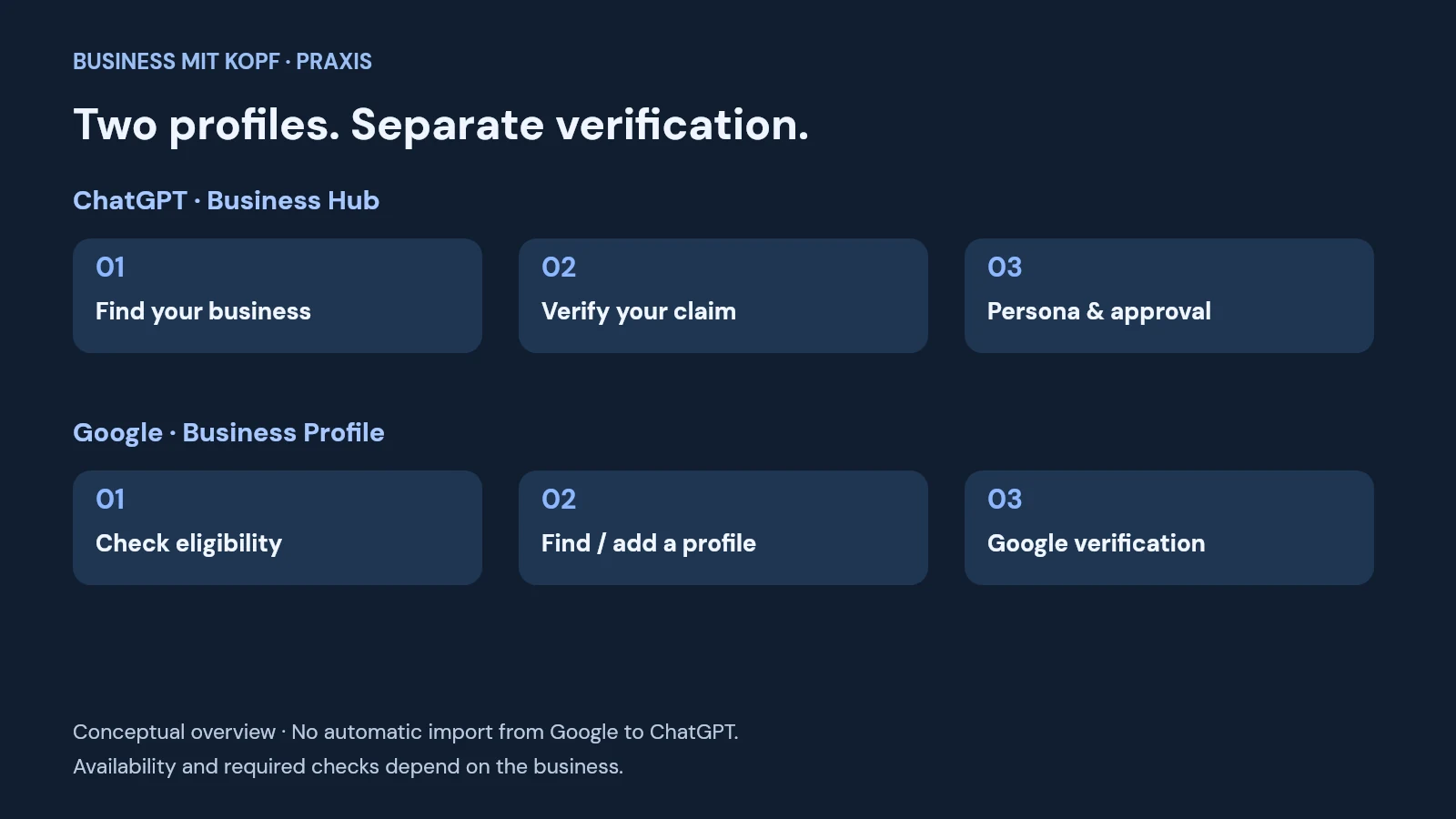
Do I need to connect my Google Business Profile?
The two profiles are managed separately. OpenAI's setup guidance lists phone, business email, domain and Shopify as possible verification methods. It does not describe a general automatic Google import or make Google verification a prerequisite. A verified Google listing therefore does not replace OpenAI's checks.
For an eligible local business, a Google profile is still a useful reference point. Compare the business name, website, phone number, services and opening hours. Customers should find the same current information on your website and on the profiles you maintain.
For example, if your agency moves, first update your reference document. Then check the contact page and every business profile you actually use. A change on one platform is not evidence that another platform has received it.
Claim or create your Google Business Profile
1. Check whether your business is eligible
Google Business Profiles generally serve businesses with in-person customer contact, such as a storefront or a service provider visiting customers. Online-only companies without that contact generally do not qualify. Do not invent a location to obtain a listing.
An entirely digital publication or an online-only shop does not automatically need a Google Business Profile. Compare how your company actually operates with Google's business eligibility guidelines.
2. Look for an existing listing first
Search Google Maps for your business name and location. If a suitable unverified listing exists, use the option to claim and manage it. If your eligible company has no listing, begin at business.google.com/add.
Check the address and business type before choosing an entry. Do not confuse another company with the same name with your own. Creating a duplicate is not a useful solution to an existing access problem.
3. Complete the verification Google offers
Google determines available methods automatically. Depending on the case, options can include video, phone, text or email, and more than one check may be needed. You cannot assume that you can freely choose your preferred method.
For a video check, prepare clear evidence of your actual business operations and authority. Follow Google's specific instructions rather than a generic checklist. Never share verification codes with someone calling unexpectedly and claiming to be support.
4. If another person already manages the listing
Use the official access or ownership request process. Google notifies the current owner. Keep the confirmation email so you can track the request. Google directs service-area businesses without a fixed customer-facing location to a separate support route.
My recommendation for agencies: Let the company retain ownership and use the available management permissions for your work. This makes access easier to understand when the company changes providers.
After approval: Make the information useful
Be specific. “We help your business succeed” communicates little. A more useful description might be: “We help small online shops plan newsletters and evaluate their marketing activity.” This is a writing example, not a claim about a particular provider.
Before approving information, check:
- Is the description factual and free of unsupported superlatives?
- Does the website link lead directly to the correct business?
- Are the services, contact details and relevant delivery information accurate?
- Are the logo and images current and cleared for publication?
- Have you assigned a date for the next review?
Schedule additional checks after a move, website relaunch or change in services. For a small business, a dependable quarterly review is often more useful than an elaborate setup that nobody maintains afterwards.
Common misunderstandings and sensible measurement
Claiming a profile does not guarantee recommendations, improved ranking or sales. OpenAI expressly states these limitations. Treat the claim as information maintenance rather than a purchased position in answers.
Keep metrics separate, too: mentions are not website visits, clicks are not enquiries, and enquiries are not revenue. OpenAI describes aggregated insights such as mentions and website clicks. Businesses do not receive private user conversations through these insights.
For your own evaluation, keep a simple change log: when you updated a profile, which details changed and which qualified enquiries you later observed. You can optionally ask new customers how they found you. This collects useful observations without attributing every fluctuation to a supposed cause.
Conclusion: Check eligibility, then set up carefully
Begin with accurate business information and a securely managed account. Check whether Business Hub offers access for your company and complete the verification actually provided. Maintain a Google Business Profile alongside it if your business qualifies.
Your own website remains the foundation: clear services, working contact details and understandable information about the company. A well-maintained profile adds to that foundation.
Sources and image credits
Image credits
Image: AI-generated conceptual illustration using OpenAI / ChatGPT; title design: Business mit Kopf. Not an actual ChatGPT or Google interface. In-article diagram: Business mit Kopf.
Content sources
- OpenAI: Introducing Businesses in ChatGPT, 10 November 2026
- OpenAI Help Center: Claiming, verification and Persona
- OpenAI: Businesses in ChatGPT – availability
- OpenAI: Terms, including no ranking guarantees
- Google: Add or claim your Business Profile
- Google: Business eligibility and ownership guidelines
- Google: Verify your business
- Google: Request ownership of a Business Profile
0 comments
No comments have been published yet.